
Dime Dime Baby AI Video Generator
Upload one photo and join the viral Dime Dime Baby AI video: bite the concha, hold the deadpan stare, then dance back into the crowd.
From 1600 credits per generation
What is Dime Dime Baby AI?
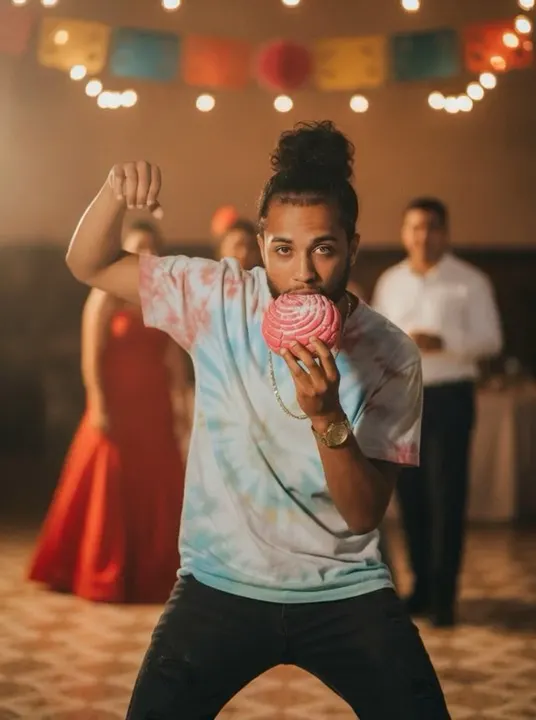
The Dime Dime Baby AI effect rebuilds the party clip that turned into a whole trend. Instead of editing you into the original footage, the AI builds a new quinceañera hall around your photo: string lights and paper decorations overhead, a blurred crowd in formal outfits, a woman in a red dress and a man in a white shirt behind you, warm party light and a tiled floor.
You dance toward the lens with bent knees and swaying shoulders, bite into a pink concha, then chew with a completely deadpan stare before turning and dancing off into the crowd. The choreography is timed second by second, and an original cumbia-pop party track with a short Spanish hook is generated with the clip.
What Is the Dime Dime Baby AI Video Trend?
The trend grew out of a quinceañera party clip: a guest dances toward the camera, bites into a pink concha, then chews with a completely flat stare before spinning back into the crowd. The deadpan face is the joke, and it is easy to recognize in a feed. The AI version rebuilds the hall around your photo — string lights, formal outfits, warm party light — and times the dance second by second. You do not need the original footage or a real quinceañera; one photo is enough to join the format.
Dime Dime Baby AI Video Generator Free: What You Get
You can start with one photo and see the exact credit cost before confirming. The tool returns a finished vertical clip with an original cumbia-pop track, so there is no editor, timeline or export step. Free does not mean unlimited: each generation consumes credits, and longer clips cost more. For a first test, pick the shortest duration and check the face, the concha bite and the deadpan timing. Once the framing works, regenerate at the full length you want to post.
Dime Dime Baby AI Video Template vs. CapCut
A CapCut template keeps the original footage and swaps in your face, so you need the source clip and matching timing. This generator does not edit you into existing video. It creates a new party hall, a new crowd, a new concha and a new original track, then animates the choreography. The benefit is that any clean photo works, even one taken at home. The trade-off is that the room and the people around you are generated, not the exact party from the clip you saw.
Dime Dime Baby AI Video Scene: What the Model Is Told
The template describes a warm quinceañera hall with string lights and paper decorations, a blurred crowd in formal clothes, a woman in a red dress and a man in a white shirt behind you. It stages the dance in order: knees bent, shoulders swaying, the bite, the deadpan chew, the turn back into the crowd. It also keeps your face, hair and clothing stable and generates an original cumbia-pop track with a short Spanish hook. You write none of this, which keeps the output close to the trend.
How to Make a Dime Dime Baby AI Video From One Photo
Use a well-lit photo of one consenting adult with the face and upper body visible. A plain background is fine because the AI replaces it. Avoid sunglasses, heavy filters and group shots, and keep your expression neutral so the deadpan chew reads clearly. Upload the photo, choose a duration and generate. If the concha or hands look wrong, regenerate before trying a different photo — short clips sometimes need a second pass. The finished clip downloads directly; no editing app is required.
Best Dime Dime Baby AI Video Generator: What to Compare
Compare generators on the things this trend depends on: a stable face through the whole dance, a concha that appears in the right hand at the right moment, deadpan timing that lands, and original audio rather than a reused song. Check the output ratio as well; 9:16 vertical is what short-video feeds crop to. Cost matters, but a cheap take that misses the bite is not a bargain. This page uses a fixed quinceañera scene, so the main variables are likeness, motion and audio.
Dime Dime Baby Original Video vs. the AI Version
The original is a real party video with a specific guest, room and crowd. The AI version borrows the joke and the choreography — the concha, the flat stare, the turn back into the crowd — but generates a new hall, new guests and a new cumbia-pop track. It is an independent, trend-inspired effect, not the original recording and not affiliated with the people in it. If you need the exact clip, this is not a replacement. If you want the same format with your own face, the recreation is the point.
Alternatives to Dime Dime Baby AI
If the quinceañera setting is not the right fit, try an adjacent effect with the same photo. Look Alive stages a full-body Shoot dance on a Memphis gym court; 58th Floor turns two photos into a COLORS-style duet; Bulin 47 keeps the street-freestyle energy outside a restaurant. Each has a fixed scene and the same upload flow, so testing two or three is quick. Pick the one where your face stays most recognizable and the body motion looks natural. Related effects are linked at the bottom of this page.
Why use this effect
One photo is enough
Upload a single front-facing photo. The AI handles the party, the dance and the audio.
Timed signature beats
The approach, the concha bite, the deadpan stare and the turn each get their own time range.
Party scene included
The quinceañera hall, string lights and blurred guests are generated around you.
Original party track
An original cumbia-pop beat and vocal hook, not a copyrighted song.
How it works
Three steps from one photo to a finished clip.
- 01
Upload your photo
Use one clear, front-facing photo of a consenting adult with the face and upper body visible.
- 02
Keep the preset
The party, the concha and the dance beats are preconfigured. Choose 5, 10 or 15 seconds and generate.
- 03
Review and download
Preview the finished clip and download it for your social channels.
Frequently asked questions
What is the Dime Dime Baby AI effect?
It is an AI video effect inspired by the viral quinceañera dance clip. You upload a photo and the AI creates a new party scene with you performing the dance.
How do I make a Dime Dime Baby AI video?
Upload one well-lit photo, choose a duration and generate. The built-in quinceañera scene stages the concha bite, the deadpan chew and the turn back into the crowd with an original cumbia-pop track.
Do I need the original video or the trending sound?
No. The scene, dance and audio are generated from your photo. If you want the trending sound, add it in your publishing app only if you have the rights.
Is the concha real?
No. The sweet bread is generated as part of the scene. Results vary between runs, so the hand and the bite may look slightly different each time.
What photo works best?
One person, front-facing, evenly lit, face and upper body visible, no sunglasses and no group shots. Avoid very dark photos and heavy filters.
How much does it cost?
A standard generation costs 1600 credits. The exact cost is shown before you confirm.
Please note
Use only photos you own or have permission to use. Do not upload minors or create content that impersonates someone without their consent. Results are AI-generated and vary between runs.
Related effects
Create your video
The scene and settings for this effect are already configured — switch the model above if you want, then upload your photos.
Create your video