
Look Alive AI Video Generator
Upload one full-body photo and watch the viral Shoot dance play out on a Memphis gym court.
From 1600 credits per generation
What is Look Alive AI?
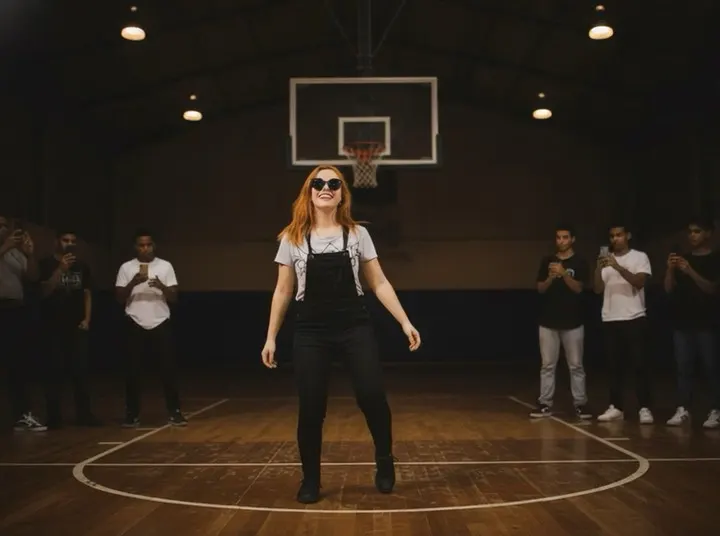
Look Alive AI recreates the full-body dance clip format: a dim Memphis gym with polished hardwood, a blurred hoop, warm overhead lights and a small crew in streetwear cheering from the baseline while someone films on a phone.
The dancer hits the signature Shoot choreography: bounces on the balls of their feet, snaps alternating leg kicks with finger-gun arms, hops side to side, drops into a low bounce and finishes with two quick kicks and a grin as the crew throws their hands up. An original Memphis trap beat drives the clip.
What Is the Look Alive AI Video Trend?
The format borrows its energy from basement and gym freestyle clips: bad lighting that looks intentional, a crew standing just outside the frame, someone filming on a phone. The Shoot dance gives it a repeatable structure — bounce, kicks, side hops, low bounce, finish — so any body can perform it once the dancer is placed on the court. Because the whole scene is generated, the trend skips the two things that block most people: a gym to shoot in and friends willing to stand in the background.
Look Alive AI Video Generator Free: What You Get
Free credits are enough to see whether the effect suits your photo, and every run quotes its cost before you confirm. A standard render returns a finished vertical dance clip with the full choreography, the cheering crew and an original Memphis trap beat. It is not an unlimited free trial: retries cost credits, and a full-body effect is the most expensive kind to get wrong. Test with the shortest duration first, then extend once the likeness holds. Because the output is vertical by default, it drops straight into short-form feeds without cropping.
Look Alive AI Video Template vs. CapCut
A CapCut dance template needs footage of you actually dancing; the template only supplies timing, captions or effects. Here the dance itself is generated from one still. That is the whole appeal — you do not have to learn the choreography or film it. The cost is that the motion is the model’s interpretation: kicks land where it decides, not where you would have landed them. Treat the output as a performance generated in your likeness, not as footage of you dancing.
Look Alive AI Video Scene: What the Model Is Told
The template builds a dim Memphis gym: polished hardwood, a blurred hoop, warm overhead lights, and a small crew in streetwear cheering from the baseline while someone films on a phone. It then scripts the Shoot choreography in order — bouncing on the balls of the feet, alternating leg kicks with finger-gun arms, side-to-side hops, a low bounce, then two quick kicks and a grin as the crew throws their hands up. The camera stays wide enough to keep the dancer in frame head to feet.
How to Make a Look Alive AI Video From One Photo
The photo matters more here than in a singing effect, because the model has to infer arms, legs and posture. Use a full-body or three-quarter shot, front-facing, with the feet visible and space around the legs; loose clothing reads better than a tight silhouette. Avoid crossed arms, hands in pockets or a seated pose — the model has to build a dance from whatever the body is already doing. Neutral standing pose, even light, plain background is ideal. One person only: a second figure in the frame gets treated as part of the dancer and breaks the choreography.
Best Look Alive AI Video Generator: What to Compare
Full-body animation exposes more than any other format, so compare the failures directly. Do the legs stay attached and readable through the fast kicks, or do they blur into each other? Does the face hold up when the camera is wide, or does it drift? Do the feet plant on the floor or slide? Is the crew static wallpaper or do they react? A generator that looks good in the first still but cannot animate a kick is not usable for this trend.
Why use this effect
Full-body dance
The camera keeps the dancer in frame from head to feet so every kick reads clearly.
Memphis gym included
Hardwood, a blurred hoop and warm gym lights are generated around your photo.
Crew reaction
A small crowd of AI-generated friends cheers from the baseline while someone films.
Original trap beat
A punchy 808 bassline and sparse piano stabs, not a copyrighted song.
How it works
Three steps from one photo to a finished clip.
- 01
Upload a full-body photo
Use one clear, front-facing photo of a consenting adult. A full-body or three-quarter shot with space around the legs gives the dance room to read.
- 02
Keep the preset
The gym, lighting and choreography are preconfigured. Choose 5, 10 or 15 seconds and generate.
- 03
Review and download
Preview the finished clip and download it for your social channels.
Frequently asked questions
What is the Look Alive AI effect?
It is an AI dance effect that animates the viral Shoot dance from your photo, set on a Memphis gym court.
How do I make a Look Alive AI video?
Upload one full-body photo with the feet visible, keep the preset and generate. The gym, the Shoot choreography and the original Memphis trap beat are built into the effect.
What photo should I upload?
A clear, front-facing full-body or three-quarter photo works best. Head-and-shoulders photos give the model little information for a full-body dance.
Does it use the original song?
No. The clip uses an original Memphis trap beat. Add a specific track in your publishing app only if you have the rights.
Are the other people in the video real?
No. The crew is AI-generated with ordinary faces; none is a real or famous person.
How much does it cost?
A standard generation costs 1600 credits. The exact cost is shown before you confirm.
Please note
Use only photos you own or have permission to use. Do not upload minors or create content that impersonates someone without their consent. Results are AI-generated and vary between runs.
Related effects
Dime Dime Baby AI
One photo drops you into the quinceañera dance: bite the concha, deadpan stare, dance off.
Try this effectCypher Circle AI
One photo drops you into a night street cypher while the circle hypes you.
Try this effectIceman AI
One photo raps a verse in a white walk-in cold room, then walks the racks, presses the beat down and turns away.
Try this effectCreate your video
The scene and settings for this effect are already configured — switch the model above if you want, then upload your photos.
Create your video