
Gangsta’s Paradise AI Video Generator
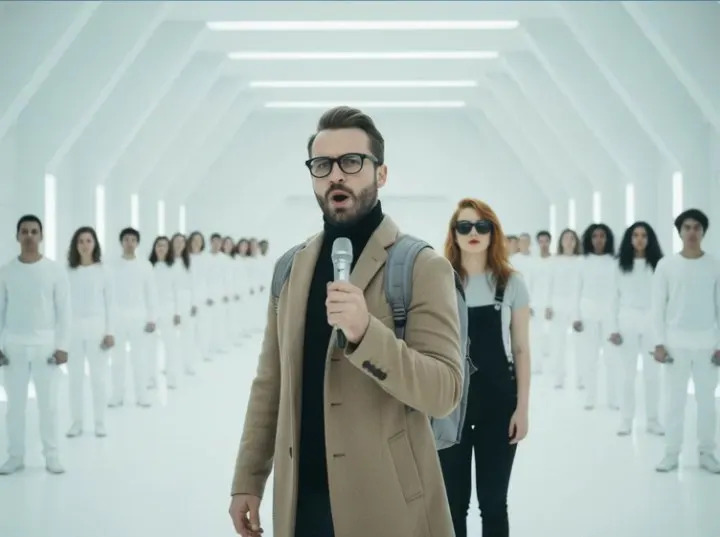
Upload two photos: one person raps the verse in a white sci-fi hangar while the other waits behind him, then steps up to sing the chorus as a white-clad backup choir raises its mics.
From 2400 credits per generation
What is Gangsta's Paradise AI?
Gangsta’s Paradise AI stages the two-person hangar performance that made the trend recognizable: a rapper with a handheld microphone in a vast white sci-fi hangar, a second performer standing behind him, waiting to sing the chorus, and rows of backup performers in plain white outfits holding their microphones up as a choir. You provide a photo for each role. Instead of cutting you into the reference clip, the effect composes a new frame from your two photos and animates it in one continuous take, so both faces stay yours.
The clip is choreographed around the roles: the rapper opens the verse, the singer stays behind him and silent, the backup choir raises its mics on the downbeat, and the singer takes one small step forward for the chorus at the end. Every run is 4:3 landscape and up to 15 seconds, with an original West Coast hip-hop beat generated alongside it, so there is no licensing question and no editing work.
What Is the Gangsta’s Paradise AI Video Trend?
The trend started as an AI fan video: two people in a white hangar lined with backup performers in plain white outfits, one rapping into a handheld microphone while the other waits behind and then steps up to sing the chorus, the choir lifting their mics behind them. People recognised the format instantly, so the two-photo structure spread quickly across social feeds. This effect keeps that structure — two roles, one hangar, one chorus — without reusing anyone’s face. You bring the rapper and the singer, the generated scene supplies the hangar and its choir, and the result reads as a new performance rather than a copy of the reference clip.
Gangsta’s Paradise AI Video Generator Free: What You Get
The form quotes the price before you confirm, and a standard run returns a finished 4:3 clip with the hangar, the white-clad choir, the chorus step-up, the camera move and an original West Coast beat. Free credits cover a few test renders rather than unlimited attempts, and every run is charged, so review the first result before trying another duration. If one face drifts, a sharper, evenly lit photo of that person usually helps more than regenerating the same upload. Nothing needs installing, and there is no timeline to learn, which makes a single render a cheap way to test whether your two photos suit the scene.
Gangsta’s Paradise AI Video Template vs. CapCut
A CapCut template layers a filter, text or a transition over footage you already shot. This effect is generative: the hangar, the white-clad choir, the raised microphones and the chorus staging are all invented, and the camera move is baked into the clip. The trade-off is control. You cannot swap the choir for a crowd, retime the chorus step-up or choose a different location. Use it when the two-role hangar performance is exactly what you want, and reach for an editor when you need to cut around existing footage or add your own titles and captions.
Gangsta’s Paradise AI Video Scene: What the Model Is Told
The template describes a vast white hangar with ribbed walls, a polished floor and two rows of real backup singers in plain white outfits, microphones lowered at their sides. It directs the performance in phases that scale to the chosen duration: the rapper opens the verse and cuts the air with a free hand, the singer waits behind him with lips closed, the choir raises its microphones on the downbeat, then the singer takes one small step forward for the chorus with a hand on the chest. It keeps the microphone in the rapper’s hand, replaces text printed on clothing, and asks for natural faces behind them. The camera starts close, eases back only to a medium two-shot and stays there in one continuous take.
How to Make a Gangsta’s Paradise AI Video With Two Photos
Upload a clear, front-facing photo for the rapper and a second photo for the singer; the order matters, because photo one becomes the voice of the verse and photo two joins the chorus. Both people should be evenly lit, without sunglasses, and photographed alone. A full-body shot works well for the singer, who is first seen standing in the background, while the rapper needs a sharp face because several beats play close to the lens. After the render, check both faces through the two-shot and watch the singer’s mouth during the chorus; if either drifts, replace that photo and rerun.
Best Gangsta’s Paradise AI Video Generator: What to Compare
Because two people share the frame, the failures are easy to spot. Does each face stay its own, or do the identities blend when the singer steps up? Does the choir keep its white outfits and formation, or melt into the walls as the camera pulls back? Does the rapper’s mouth hold the beat while the singer’s chorus actually tracks the vocal? Listen for whether the beat is original and whether the bass and guitar sit under the verse instead of fighting it. A generator that paints a convincing hangar but blends the two faces is worse than a simpler tool that keeps both people recognisable.
Why use this effect
Two photos, two roles
One upload raps the verse; the other waits behind, then steps up to sing the chorus.
Hangar backup choir
Rows of backup performers in plain white outfits raise their microphones as a backing choir.
Original West Coast beat
A warm bass line, boom-bap drums and muted guitar carry the verse.
15-second take
4:3 landscape, one continuous camera move from the mic to a medium two-shot.
How it works
Three steps from one photo to a finished clip.
- 01
Upload the rapper
Use one clear, front-facing photo of a consenting adult who should perform the verse.
- 02
Upload the singer
Add the second person’s photo — a full-body shot helps, since the singer is first seen standing in the background. Choose 5, 10 or 15 seconds and generate.
- 03
Check both faces and download
Review both people in the two-shot and the singer’s chorus, then download the 4:3 MP4.
Frequently asked questions
What is the Gangsta’s Paradise AI effect?
It is a two-photo AI rap effect: you rap a verse in a white sci-fi hangar while a second performer waits behind you and then steps up to sing the chorus while a white-clad backup choir backs you.
Do I need two photos?
Yes. Photo one is the rapper and photo two is the singer. The effect composes both people into one frame before animating it, so each role needs its own clear photo.
Who raps and who sings?
The rapper performs the verse for most of the clip. The singer stays silent in the background, then steps up beside the rapper for the closing chorus.
Is this affiliated with any film or brand?
No. The hangar and the backing choir are original generated scenery with no armour, helmets, insignia or characters from any film, and the effect is an independent fan-style format with no affiliation to any film studio, artist or label.
Does it use the original song?
No. The clip ships with an original West Coast hip-hop beat and generated vocals. If you want a specific track, add it in your publishing app only when you hold the rights.
Can I choose a longer clip?
Yes. Pick 5, 10 or 15 seconds when you generate. The default 15 seconds fits the chorus step-up, the white-clad choir and the closing chorus.
How much does it cost?
A standard generation costs 2400 credits. The exact cost is shown before you confirm.
Please note
Use only photos you own or have permission to use, and make sure everyone pictured has agreed to appear. This is an independent AI effect inspired by a public music trend and is not affiliated with any artist, label or film studio. Results are AI-generated and vary between runs.
Related effects
Burning Bridges AI
One photo makes you the lead in a chandelier-lit rap party.
Try this effectIceman AI
One photo raps a verse in a white walk-in cold room, then walks the racks, presses the beat down and turns away.
Try this effectCypher Circle AI
One photo drops you into a night street cypher while the circle hypes you.
Try this effectCreate your video
The scene and settings for this effect are already configured — switch the model above if you want, then upload your photos.
Create your video