
Hotel Lobby AI Video Generator
Turn two photos into a Hotel Lobby AI video — a COLORS-style two-person performance in a burnt-orange studio booth.
From 1600 credits per generation
What is Hotel Lobby?
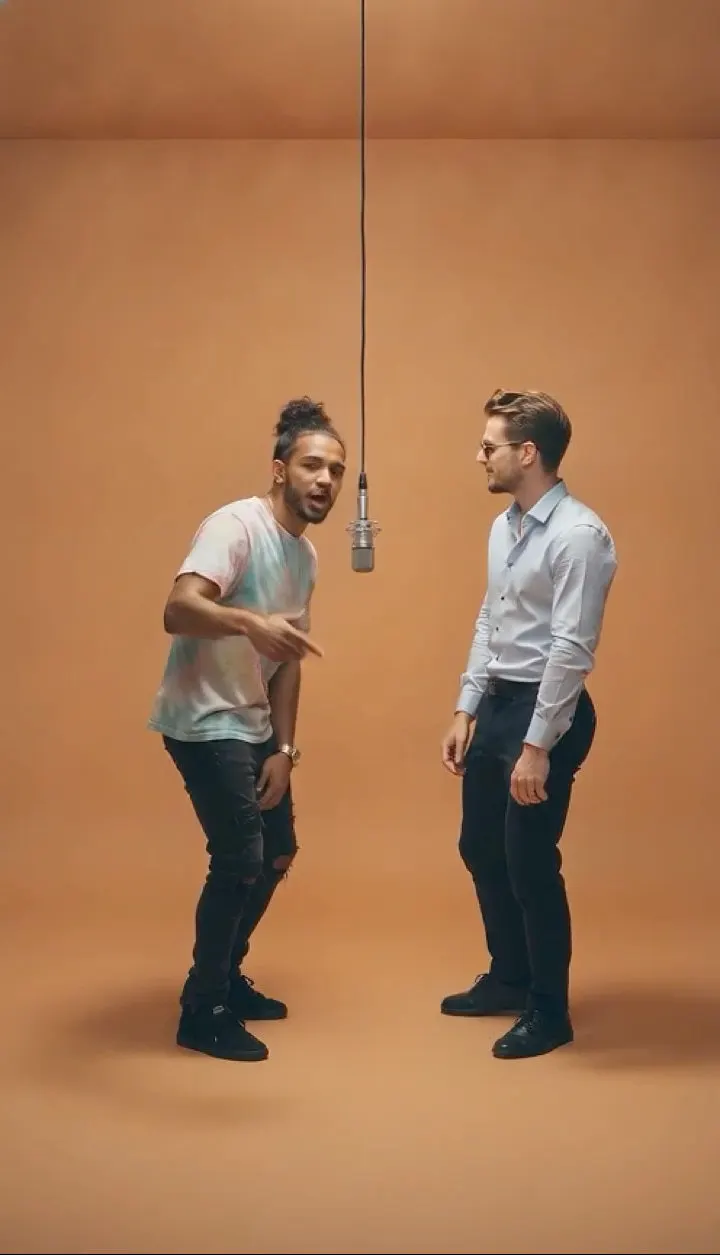
The Hotel Lobby effect recreates the two-person COLORS-style performance format: a minimalist burnt-orange room, a single vintage microphone hanging between the performers, and a fixed front-facing camera.
Upload one photo per person. An image model first places both people side by side in one vertical frame, then a video model animates them trading rap verses into the shared hanging microphone: the active performer leans in and articulates the bars while the other nods, bounces and gestures, then they switch. Faces, hair, skin tone and clothing stay recognizable.
What Is the Hotel Lobby AI Video Trend?
Hotel Lobby is the name of the effect, not a requirement to film in a hotel. The format it recreates is the two-person COLORS-style booth: a plain burnt-orange room, one vintage microphone hanging between two performers and a camera that stays close. The trend works because the setting is minimal and the performance carries the clip. The AI version takes one photo per person, merges both into the same vertical frame, then animates them trading verses. You get the format without booking a studio or finding a second performer who can rap on camera.
Hotel Lobby AI Video Generator Free: What You Get
You can start with two photos and see the full credit cost before confirming. The tool returns a finished vertical duet with an original beat, so there is no editor or audio sync step. Free does not mean unlimited: each render consumes credits, and the two-stage pipeline — merge the photos, then animate them — is priced accordingly. For a first attempt, keep the default duration and check both faces before trying a longer clip. If one person’s likeness fails, replace only that photo rather than rerolling the whole scene.
Hotel Lobby AI Video Template vs. CapCut
A CapCut template assumes you already have two people on video and makes a cut around them. Here, neither person needs to be filmed. Two stills become one stage, and the model invents the performance between them. That is the main advantage: different schedules, different cities and different lighting in the source photos do not block the duet. The trade-off is that body motion and lip sync are generated, so the result looks like a stylized performance rather than a recorded take. Use it when the format matters more than documentary realism.
Hotel Lobby AI Video Scene: What the Model Is Told
The template first builds a still frame: both people side by side in a burnt-orange room, a single vintage microphone between them, a fixed front-facing camera and clean studio lighting. A second pass animates the frame: the active performer leans into the mic and articulates the bars while the other nods and bounces, then they switch. Faces, hair and clothing are preserved from each upload, and an original track is generated. Because the camera is fixed, the effect depends on the performance rather than cuts or camera moves.
How to Make a Hotel Lobby AI Video With Two Photos
Pick two front-facing photos, one per consenting adult, with similar lighting and no sunglasses. You do not need matching backgrounds — the room is generated — but similar camera height makes the merged frame look natural. Avoid photos where a hand covers the mouth, because the lip sync has less to work with. Upload both images and generate. Check that the two people are the same relative size; if one looks pasted in, retry with a photo taken at a similar distance from the subject.
Best Hotel Lobby AI Video Generator: What to Compare
Two-person generation is harder than a solo clip, so compare exactly where it fails. Does each face stay recognizable when they switch roles? Is the lip sync tied to the active performer or does both mouths move at once? Does the hanging microphone stay between them, or drift? Is the audio original? Finally, check the merge: a good result looks like two people in one room, not two cutouts on a background. Cheap generations often fail at the merge, which is the first thing to inspect.
Why use this effect
Two photos, one stage
Each performer gets their own photo; the AI merges them into one frame.
Merge, then animate
A two-step pipeline composes the shot before bringing it to life.
Locked camera
The stage, lighting and camera angle stay fixed, like the original format.
Performance motion
The two performers trade rap verses into the shared mic, nodding, bouncing and gesturing on the beat.
How it works
Three steps from one photo to a finished clip.
- 01
Upload the left performer
The first photo becomes the person standing on the left.
- 02
Upload the right performer
The second photo becomes the person standing on the right.
- 03
Generate and download
The AI composes the frame, animates it and returns one finished clip.
Frequently asked questions
How do I make a Hotel Lobby AI video?
Upload one front-facing photo per performer and generate. The image model merges both into the burnt-orange booth, then the video model animates them trading verses into the hanging microphone.
How many photos do I need?
Exactly two — one for each performer. The first upload is placed on the left and the second on the right.
What if I only have one photo?
Use a single-person effect such as Bulin 47 AI or Burning Bridges AI instead, or upload two different photos of the same person.
Do the two people need to look similar?
No. Any two consenting adults work. Clear, evenly lit, front-facing photos give the most stable faces.
Is the original audio included?
No. The clip is generated by AI with an original beat and does not use the original COLORS recording.
What photo works best?
One person per photo, front-facing, full body or upper body, good lighting, no group shots. Keep the same order when you retry.
How much does it cost?
A standard generation costs 1600 credits. The exact cost is shown before you confirm.
Is this affiliated with COLORS?
No. “COLORS-style” describes the visual format only. This effect is not affiliated with or endorsed by COLORS.
Please note
Use only photos you own or have permission to use. “COLORS-style” is a descriptive reference and does not imply affiliation. Results are AI-generated and vary between runs.
Related effects
Create your video
The scene and settings for this effect are already configured — switch the model above if you want, then upload your photos.
Create your video