
Iceman AI Video Generator
Upload one photo and rap through a white walk-in cold room: lean on the wall, jab at the lens, walk the racks, press the beat down and finish with a thumb over your shoulder.
From 2400 credits per generation
What is Iceman AI?
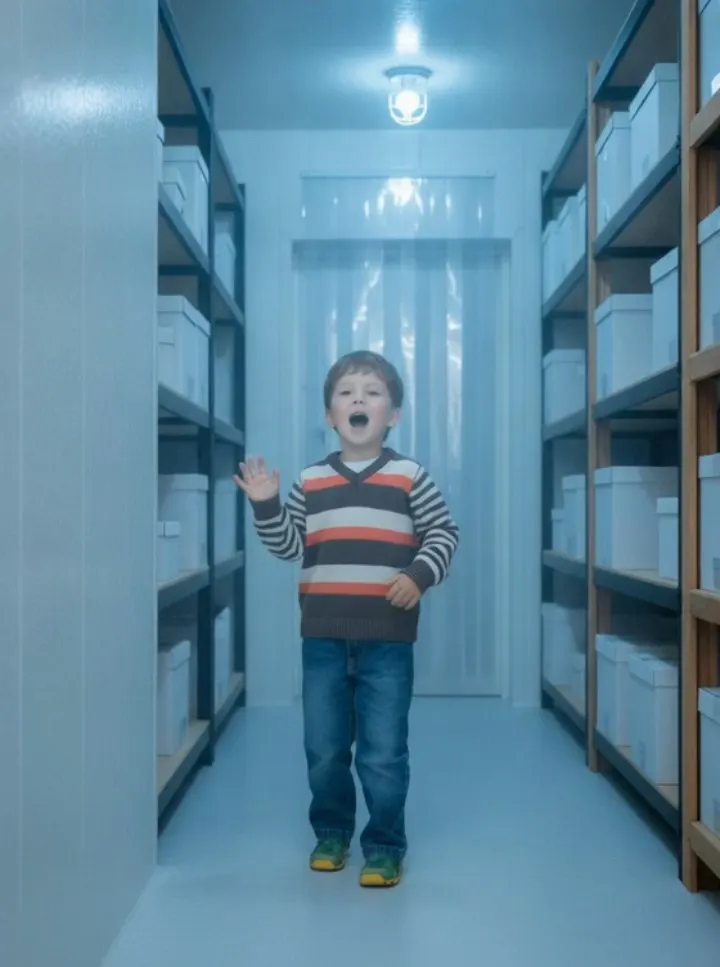
Iceman AI puts you inside the cold-room rap scene that became the trend: white insulated walls, a clear strip curtain at the doorway, black and wood racks stacked with plain white boxes, caged ceiling lamps and hard blue-white light. The effect builds that room around a single photo instead of cutting you into someone else’s footage, so the framing, the racks and the light all adapt to you — and you keep your own face, hair and outfit in every shot.
The choreography runs the way the trend does: lean on the wall and open the verse, jab a hand at the lens, walk the shelves, press the beat down with both arms, throw up V signs, tap a fist to the temple and turn away with a thumb over the shoulder, ending on a low angle under a lamp. A run lasts up to 15 seconds, and an original cold trap beat is generated with the clip so you can post straight away.
What Is the Iceman AI Video Trend?
The trend takes one scene from the Iceman-era music videos — a white walk-in storage room, racks of plain boxes, cold lamps — and turns it into a template anyone can step into. In the reference clip one person raps straight into a handheld camera, leans on the wall, walks the shelves and finishes with a turn away. AI tools replace the performer with the person in your upload. This effect does the same without borrowing footage, face or voice: the room is generated, the choreography follows the trend’s beats, and your photo supplies the rapper.
Iceman AI Video Generator Free: What You Get
The form quotes the price before you confirm, and a standard run returns a finished vertical clip with the cold room, the full move sequence and an original cold trap beat. Free credits cover a few test renders rather than unlimited attempts, and every run is charged, so review the first result before trying another duration. If the likeness drifts, a sharper photo with the whole outfit visible usually helps more than rerunning the same upload. Nothing needs installing, and there is no timeline to learn, so one render is a cheap way to test whether a photo suits the room.
Iceman AI Video Template vs. CapCut
A CapCut template layers a filter, text or a transition over footage you already shot. This effect is generative: the insulated walls, the strip curtain, the racks of white boxes, the caged lamps and the low angle are all invented, and the move sequence is baked into the clip. The trade-off is control. You cannot choose a different room, retime the shelf walk or change the light temperature. Use it when the cold-room look is exactly what you want, and use an editor when you need to cut around existing footage or add your own titles.
Iceman AI Video Scene: What the Model Is Told
The template describes a white walk-in storage room with insulated wall panels, a clear strip curtain at the doorway, black and wood racks stacked with plain white boxes, and caged ceiling lamps casting cold blue-white light. It then directs the performance beat by beat: the wall lean and opening verse, the jab at the lens, the walk along the racks, the two-handed press on the downbeat, the V signs and the fist to the temple, then a half turn with a thumb over the shoulder as the camera drops to a low angle under a lamp. The whole sequence plays as one continuous handheld take.
How to Make an Iceman AI Video From One Photo
Use one photo of a single adult, ideally full-body or knee-up, because the clip shows your whole outfit while you walk the racks. The face should be clear and looking roughly at the camera; avoid sunglasses, group photos, heavy filters and arms cropped off at the edge of the frame. You keep the clothes from your photo, so there is no costume to coordinate. A portrait photo gives the vertical cut, while a landscape upload produces the wider look. After the first render, check the face through the close-ups and the low angle under the lamp.
Best Iceman AI Video Generator: What to Compare
Because the room is tight and the moves are specific, small errors stand out. Do the racks stay behind you, or do boxes drift through your shoulders? Does the strip curtain and the cold light stay consistent as the camera moves, or does the room warm up mid-clip? Does the jab land on the downbeat, does the two-handed press read clearly, and does the mouth stay on the beat while the hands stay natural? Listen for whether the beat is original and whether the 808 sits under the vocal instead of clipping over it. A generator that renders a convincing still but misses the moves is worse than a simpler one that animates the sequence cleanly.
Why use this effect
The whole cold room
Insulated walls, a strip curtain, racks of white boxes and caged lamps are built around your photo.
Every move, on time
Wall lean, jab at the lens, shelf walk, two-handed press, V signs, fist to the temple, thumb over the shoulder.
Your face and outfit
You keep your own face, hair and clothes in every shot, including the close-ups and the low angle under the lamp.
Vertical or landscape
A portrait photo gives 9:16 for Reels and Shorts; a landscape upload produces the wider look.
How it works
Three steps from one photo to a finished clip.
- 01
Upload your photo
One clear photo of a consenting adult, full-body or knee-up, so the whole outfit stays in frame.
- 02
Keep the preset
The room, lighting and choreography are preconfigured. Choose 5, 10 or 15 seconds — 15 fits the full sequence — and generate.
- 03
Review and download
Check the face in the close-ups and the low angle, then download the clip and add your own sound.
Frequently asked questions
What is the Iceman AI effect?
It is the cold-room rap clip from the Iceman-era videos: one person raps into a handheld camera in a white storage room, walks the racks, presses the beat down and turns away. You step in as the rapper with one photo.
What photo should I use?
One photo of one adult, ideally full-body or knee-up with the whole outfit visible and the face clear and looking roughly at the camera. Avoid sunglasses, group photos, heavy filters and arms cropped at the edge.
Does it use the original song?
No. The clip ships with an original cold trap beat and generated vocals, and it never imitates the artist’s voice. If you want a specific track, add it in your publishing app only when you hold the rights.
Is this the “I AM ICEMAN” AI song?
No. That was a separate meme built from fake AI songs passed off as leaks. This effect makes a video of you, not a song, and it does not copy any artist’s voice.
Can I use a photo of a celebrity or a friend?
Only photos of yourself or people who agreed to be in the video. Do not upload public figures, or anyone who has not consented.
Can I choose a longer clip?
Yes. Pick 5, 10 or 15 seconds when you generate. The default 15 seconds fits the wall lean, the shelf walk and the final turn.
How much does it cost?
A standard generation costs 2400 credits. The exact cost is shown before you confirm.
Please note
Use only photos you own or have permission to use, and make sure everyone pictured has agreed to appear. This is an independent AI effect inspired by a public music trend and is not affiliated with any artist, label or platform. Results are AI-generated and vary between runs.
Related effects
Create your video
The scene and settings for this effect are already configured — switch the model above if you want, then upload your photos.
Create your video