
Bulin 47 AI vs CapCut: Which Makes a Better Video?
A CapCut template swaps your face into the original clip. The Bulin 47 AI effect builds a new street scene from one photo. An honest comparison of input, output, control and cost.
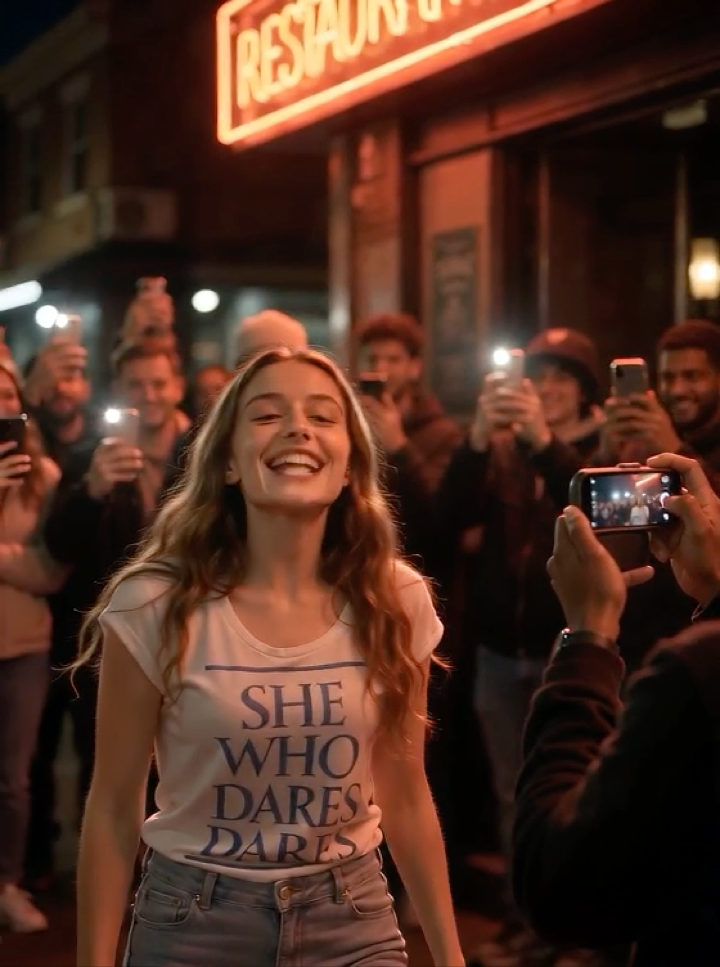
The Bulin 47 shoulder dance is everywhere, and there are now two very different ways to put yourself in it: a CapCut template that edits your face into the original footage, or an AI effect that rebuilds the scene around a photo you upload.
They look similar in a feed. They are not the same workflow, and the right choice depends on what you already have and how much control you want.
The short answer
- Use CapCut if you already have the original clip, want the exact timing and framing of the source video, and are comfortable editing on a phone.
- Use the AI effect if you only have a photo, want a new performance rather than a face swap, and would rather not edit anything.
RapVid's Bulin 47 AI effect sits in the second camp: one photo goes in, a finished vertical clip comes out.
How the CapCut route works
A CapCut template is a saved editing project. It expects a piece of source footage, usually the original trend clip, and replaces a tracked region with your face. The template carries the timing, transitions and audio, so the work is mostly finding the clip, importing your photo or video, and adjusting the face position until it tracks cleanly.
That approach has real strengths:
- The result follows the original performance beat for beat.
- The template is usually free to use inside CapCut.
- You can trim, add captions and change the music before exporting.
It also has constraints:
- You need the source clip, and it has to be the version the template was built for.
- A still photo often tracks poorly when the head turns or the camera shakes.
- The final quality depends on your phone, the template and how carefully you place the mask.
- You are editing someone else's footage, which matters if you publish commercially.
How the Bulin 47 AI effect works
The AI route does not edit you into the original video. It reads your photo, keeps your face, hair, skin tone and clothing, and generates a new performance in a scene built to match the trend: a red-lit restaurant entrance at night, a friend holding a round speaker at shoulder height, a few onlookers filming on their phones. You rap to camera, break into the shoulder bounce and laugh with the crowd.
Because the scene is generated rather than reused, the photo can come from any background and any crop. You do not need the original clip, CapCut, a green screen or editing skills. The trade-off is that the result is a new performance, not a beat-for-beat copy of the clip you saw.
Side-by-side
- Input. CapCut needs the original clip plus your face photo or video. The AI effect needs one portrait photo.
- What changes. CapCut swaps your face into existing footage. The AI effect generates a new scene and performance around your photo.
- Editing required. CapCut: yes — import, track, adjust, export. AI effect: no — upload and generate.
- Match to the original. CapCut is very close if the tracking works. The AI effect is inspired by the trend, not a frame-for-frame copy.
- Audio. CapCut uses the template's audio or a track you add. The AI effect generates an original beat with the clip.
- Photo flexibility. CapCut needs a front-facing shot that tracks. Any clear, well-lit portrait works for the AI effect.
- Cost. The CapCut template is free, with optional paid features. The AI effect charges credits per generation (1,600 for a standard Bulin 47 clip).
- Best for. CapCut: recreating the exact trend clip. AI effect: starring in your own version from a photo.
Where CapCut wins
If the goal is to reproduce the exact clip your friends sent you, CapCut is hard to beat. The template already knows the timing, and a good source clip gives you the original energy, camera movement and crowd. It is also the better choice if you want to keep editing: add text, cut to a second clip, or layer a different song on top.
Where the AI effect wins
The AI route wins on friction and flexibility. Most people do not have the original footage, do not want to install an editor, and do not have a photo that tracks well in a face-swap template. Uploading one portrait and getting a finished clip in a couple of minutes is a much shorter path.
It also gives you a scene that is yours. The restaurant, the speaker and the crowd are generated for this clip, so the result does not depend on someone else's footage or permission.
What it costs
A standard Bulin 47 generation costs 1,600 credits. On RapVid, that is roughly one $9 credit pack, or less per clip on the larger subscription plans — the pricing page shows the current options. The exact amount is displayed before you confirm, and a failed or timed-out generation is refunded automatically.
CapCut's template is free to apply, with optional paid features. If you already pay for CapCut Pro and have the source clip, the marginal cost of one more edit is effectively zero. That is a real advantage — but it assumes you have the clip and the time.
How to make the AI version
- Open the Bulin 47 AI page and sign in.
- Upload one clear, evenly lit portrait with the face and upper body visible. Avoid sunglasses, group shots and heavy filters.
- Keep the 10-second default for the first run, and add an optional direction if you want a specific lyric or mood.
- Generate, review the clip, and download it. If the likeness drifts, try a sharper photo or a shorter duration.
You can also start from the rap video effects tool and pick the effect there, or write a theme first in the rap song generator and pair the track with your clip.
Frequently asked questions
Do I need CapCut to make a Bulin 47 AI video?
No. The effect runs in the browser. You upload a photo, choose a duration and generate; there is no timeline, mask or export step.
Is the AI version the same as the CapCut template?
No. The CapCut template edits you into the original footage. The AI effect generates a new scene, performance and beat around your photo. The dance and visual cues are inspired by the trend, but the result is not a copy of the source clip.
Can I use both?
Yes, and some people do: generate the AI clip for the performance, then use CapCut to add captions, trim the ending or combine it with a second shot.
Which one looks more realistic?
A well-tracked CapCut face swap can look closer to the original footage. The AI version looks like a newly filmed performance, which is more convincing when the photo is sharp and front-facing and less convincing when the source photo is blurry or heavily filtered.
Try it with one photo
If you already have the clip, CapCut is a sensible shortcut. If you have a photo and want your own version of the trend, start with the Bulin 47 AI effect — and read how to make a Bulin 47 AI video before you upload, or browse 15 ideas for what to do with it.
RapVid is an independent tool and is not affiliated with CapCut, Bulin 47 or Kevin Wai.